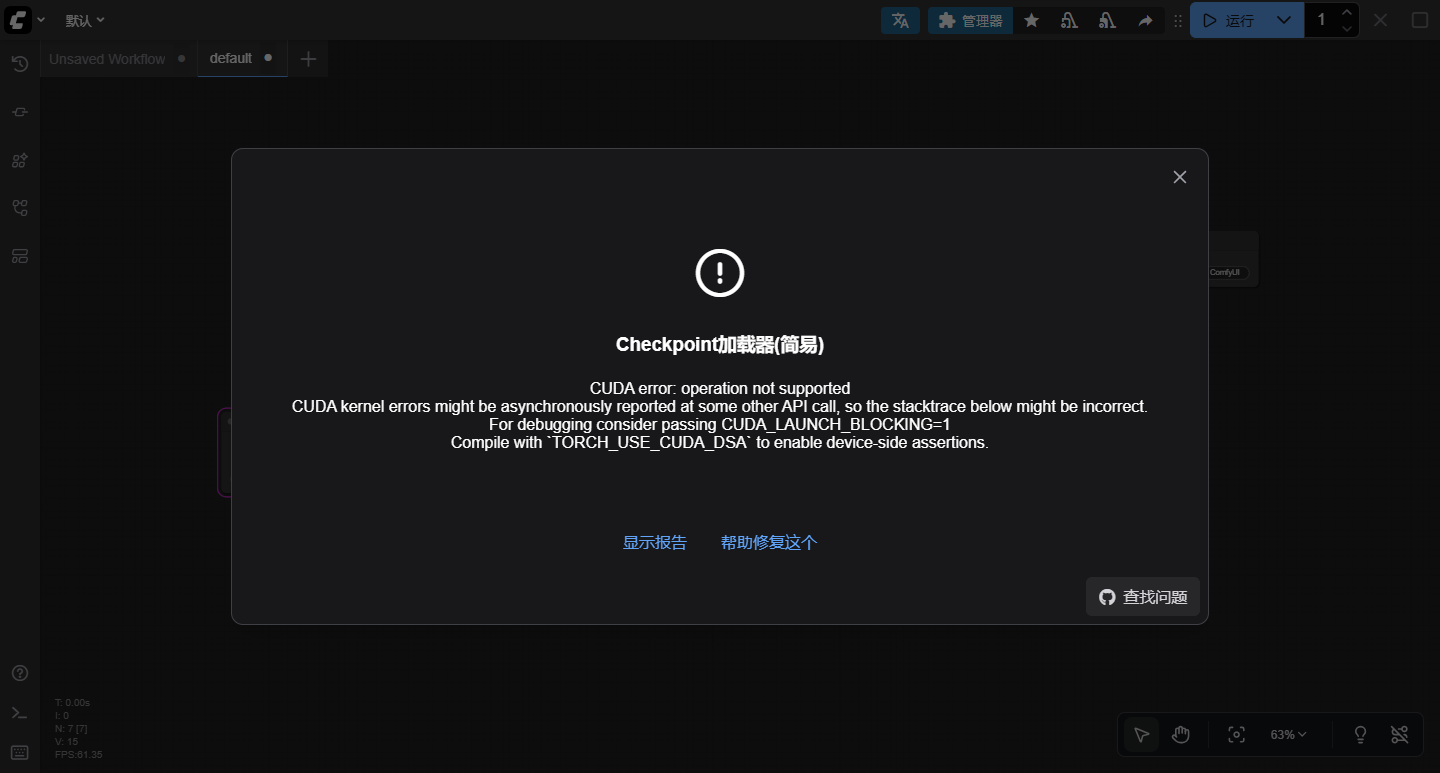
【ComfyUI】RuntimeError: CUDA error: operation not supported
前言最近好不容易,安装好ComfyUI后,启动也OK,点击生成图片时,报错了got promptmodel_type EPSadm 0making atten,RuntimeError: CUDA error: operation not supported CUDA kernel errors might be asynchronously reported at some other API call, so the stacktrace below might be incorrect. For

You need pytorch with cu130 or higher to use optimized CUDA operations
WARNING: You need pytorch with cu130 or higher to use optimized CUDA operations
ReActor插件nsfw模型下载
https://huggingface.co/AdamCodd/vit-base-nsfw-detector/resolve/main/config.json
https://huggingface.
onnxruntime::TryGetProviderInfo_CUDA
[E:onnxruntime:Default, provider_bridge_ort.cc:2395 onnxruntime::TryGetProviderInfo_CUDA] N:\_work\1\s\onnxruntime\core\session\provider_bridge_ort.cc:1988 onnxruntime::ProviderLibrary::Get [ONNXRuntimeError] : 1 : FAIL : Error loading "D:\Minico
ModuleNotFoundError: No module named ‘pkg_resources’
报错原因
根因在于 setuptools 82.0.0 正式移除了 pkg_resources 模块。setuptools 官方自 2024 年起将 pkg_resources 标记为弃用,并在 82.0.0 版本中彻底删除。如果当前环境装的是这个版本或更高版本,所有依赖 pkg_resources 的项目都会报同样的错。换句话说,不是你漏装了什么,而是 setuptools 升级后把它砍掉了
PyTorch下载
官网地址:https://pytorch.org/
torch对应版本下载链接:https://pytorch.org/get-started/previous-versions
英伟达驱动,cuda,cudnn,onnxruntime各个版本下载地址
cuda下载地址:
最新cuda下载地址https://developer.nvidia.com/cuda-downloads/
cuda其他版本下载列表:htt
CUDA error cudaErrorNoKernelImageForDevice:no kernel image is available for execution on the device
在使用CUDA编程时,遇到错误 "cudaErrorNoKernelImageForDevice: no kernel image is available for executio
ONNXRuntimeError: Non-zero status code returned while running Relu node. Name:'Relu_2'
ONNXRuntimeError: Non-zero status code returned while running Relu node. Name:'Relu_2' Status Message: CUDA error cudaErrorNoKernelImageForDevice:no kernel image is available for execution on the device.
Reactor 交换节点在工作流中运行正常且成功,但结果却没有任何变化。
在comfyui中使用reactor出现No faces found错误,一般是由于电脑的cuda版本不配套,降低或者升级cuda版本就可以解决问题
Unable to import dependency onnxruntime
无法导入 onnxruntime 依赖通常是由几个常见原因引起的。下面是一些步骤和解决方案,可以帮助你解决这个问题:
insightface model is required for FaceID models
解决步骤
安装 insightface
1. 根据你的Python版本,下载相对应的insightface whl文件。比如,对于Pyt
ComfyUI-Impact-Pack安装错误不能运行的问题
克隆安装:git clone https://github.com/ltdrdata/ComfyUI-Impact-Subpack.git
导出变量位置:
export COMFY
TORCH_USE_CUDA_DSA错误解决方案一
CUDA error: operation not supported
CUDA kernel errors might be asynchronously reported at some other API call, so the stacktrace below might be incorrect.
For debugging consider passing CUDA_LAUNCH_BLOCKING=1
Compile with `TORCH_USE_CUDA_DSA` to enabl
【ComfyUI】RuntimeError: CUDA error: operation not supported
前言最近好不容易,安装好ComfyUI后,启动也OK,点击生成图片时,报错了got promptmodel_type EPSadm 0making atten,RuntimeError: CUDA error: operation not supported
CUDA kernel errors might be asynchronously reported at some other API call, so the stacktrace below might be incorrect.
For
Hugging Face 国内镜像地址使用
在 AI 开发过程中,Hugging Face 作为全球顶尖的开源模型与数据集社区,几乎是每个算法工程师的必备工具。然而国内用户在访问官方仓库时,常常遭遇网络超时、下载中断、速度缓慢等问题。国内主流 Hugging Face 镜像平台
mysql emoji表情_Mysql支持emoji表情
解锁新技能:让MySQL数据库支持Emoji表情存储 文章目录 解锁新技能:让MySQL数据库支持Emoji表情存储 一
😺dzNodes插件所需要的模型下载
下载模型国内用户请从百度网盘或者夸克网盘,海外用户请从huggingface,下载全部模型文件并复制到ComfyUI\model
ComfyUI_LayerStyle插件SegmentAnything Ultra V2节点使用错误
ComfyUI_LayerStyle插件SegmentAnything Ultra V2要配备的模型
ComfyUI_LayerStyle插件dzNodes节点安装错误
ComfyUI_LayerStyle dzNodes节点 是ComfyUI 的一组节点,可以合成图层和蒙版以实现类似 Photoshop 的功能。
将PhotoShop的部分基础功能迁移至ComfyUI,旨在集中工作流程,减少软件切换频率。
ComfyUI性能优化与多GPU部署指南
你是否在使用ComfyUI时遇到过生成速度慢、显存不足或多GPU资源无法充分利用的问题?本文将从显存管理、计算优化和多设备配置三个维度,详解如何压榨硬件潜力,让AI绘图效率提升300%。读完本文后,你将掌握:VRAM状态调节、XFormers加速、多GPU设备分配的实战技巧,以及通过命令行参数和代码配置实现性能调优的具体方法。